AI assistant for your visitors
A chat button on your published website. It answers visitors around the clock from your website's content, in the language they write in, and passes contact requests to you. Each answer uses about 0.1 credits. Included in every plan.
Switch it on
Open Cloud in the editor and switch on AI assistant, or ask for it in the chat.
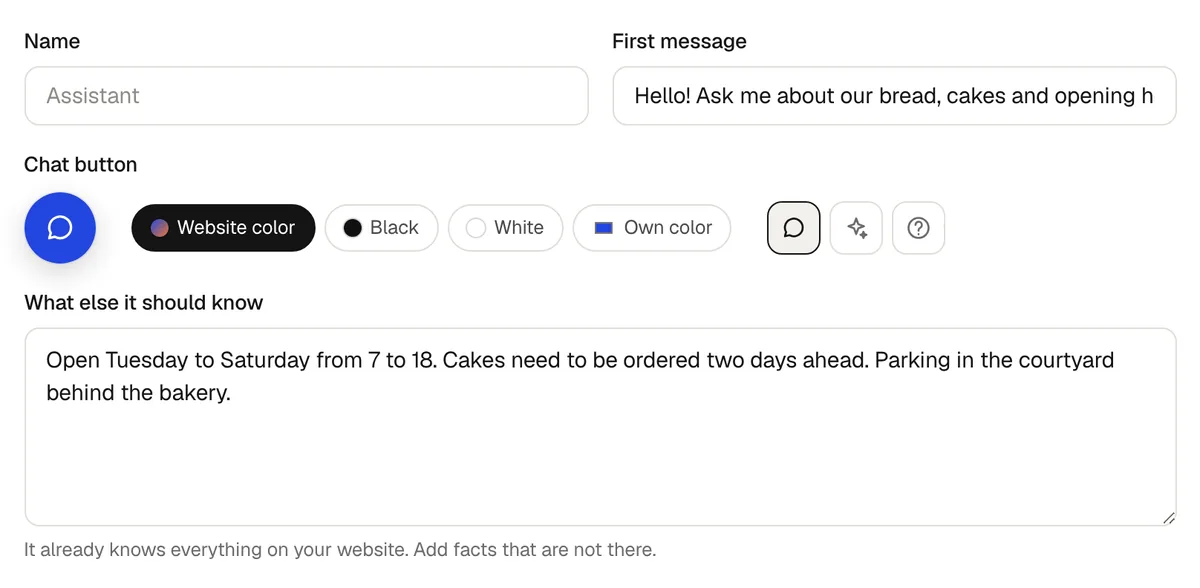
Give it a name and a first message, and choose how the chat button looks. See below.
Publish the website, if it is not online yet. Visitors see the chat button at the bottom right.
Settings
- Name
- Shown at the top of the chat. Empty means “Assistant” in the language of your website.
- First message
- What the chat says when it opens. Empty means a greeting in the language of your website.
- Chat button
- In the color of your website, black, white or a color you pick, with a speech bubble, a sparkle or a question mark.
- What else it should know
- Up to 6,000 characters of facts that are not on your website, like where to park or which days you deliver. It already knows everything on your website.
- Monthly limit
- How many credits the answers to visitors may use a month: 5, 10, 25, 50, 100 or 250 credits, about 50 to 2,500 answers, or no limit. A new assistant starts at 10 credits.
Click Save after changing them. The preview shows the chat button right away.
What it answers from
- The text of your website.
- The current entries of the tables your website shows, like the menu or the timetable.
- Your notes under What else it should know.
It does not search the internet. When something is not there, like a price, it says it does not know and offers to pass the question on to you. It answers questions about your business only.
Contact requests
When a visitor wants to be contacted, the assistant asks for a name and an email address or phone number. The request lands in Messages, marked as coming from the AI assistant, and arrives by email. Visitors who want to book or buy are pointed to your booking page or shop.
Try it first
Below the settings in the Cloud tab is a test chat. It answers from your current draft, also before you publish. Test answers use credits but do not count toward the monthly limit, and contact requests you make there are not sent.
Cost and the monthly limit
Each answer uses about 0.1 credits, paid from your credits. The Cloud tab shows this month's answers to visitors, the credits used and the contact requests.
When the monthly limit is reached, or your account has no credits left, the chat stops answering and visitors see a note to use your contact details. It answers again next month, after you raise the limit, or once you have credits again.
Conversations
frascati does not keep the conversations, so you cannot read them afterwards. The chat tells visitors that answers come from an AI and can contain mistakes. The answers come from Claude Haiku 4.5 by Anthropic, and from Claude Sonnet 5.5 if Haiku fails.
What it does not do
- It does not take bookings or orders. It points visitors to your booking page or shop.
- It is not a live chat: you cannot join a conversation.
- It is not part of the downloaded source code. frascati adds it when it serves your published website.
Something missing or unclear? Write to us.