Messages and visitor numbers
Messages from the forms on your website land in the editor and in your inbox, and you answer them right there. The Visitors view counts how often your pages are opened. Neither needs anything to install.
Messages from your forms
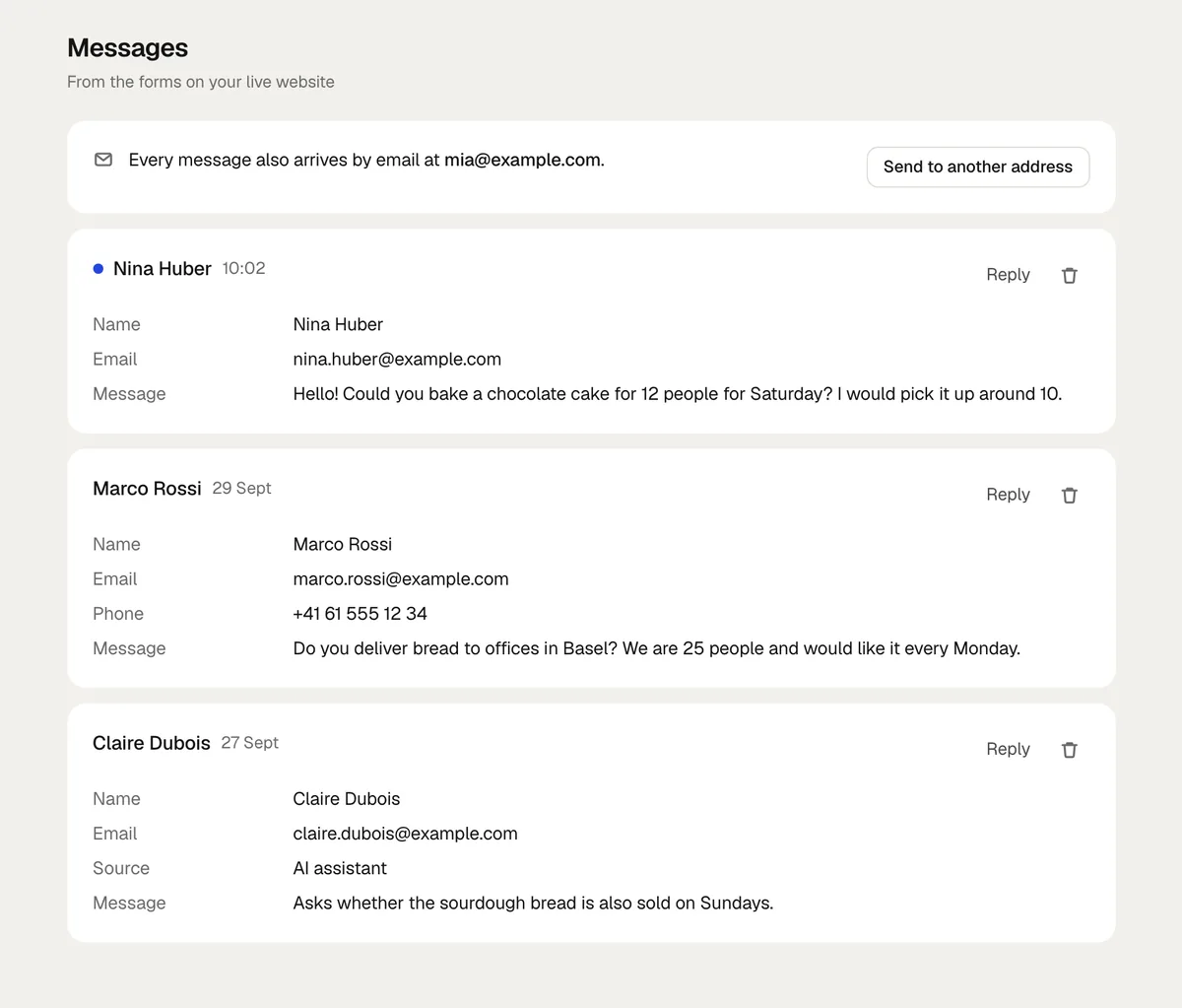
Open Messages in the editor. Every message from a form on your published website is there, newest first, with the form and the page it came from. A blue dot marks the ones you have not seen yet, and their number shows next to Messages. Forms in the preview do not send anything; they start once the website is published.
- Reply opens a reply under the message: write it and send it from frascati, or open it in your email program. See Answer in frascati.
- Each message is New, Answered or Done. Click its status to change it. All, New, Answered and Done above the list show only those.
- The search finds messages by name, email address or text.
- CSV downloads the messages shown, with your choice above the list and your search, for Excel or another system.
- The bin deletes a message.
- Contact requests from the AI assistant land here too.
Answer in frascati
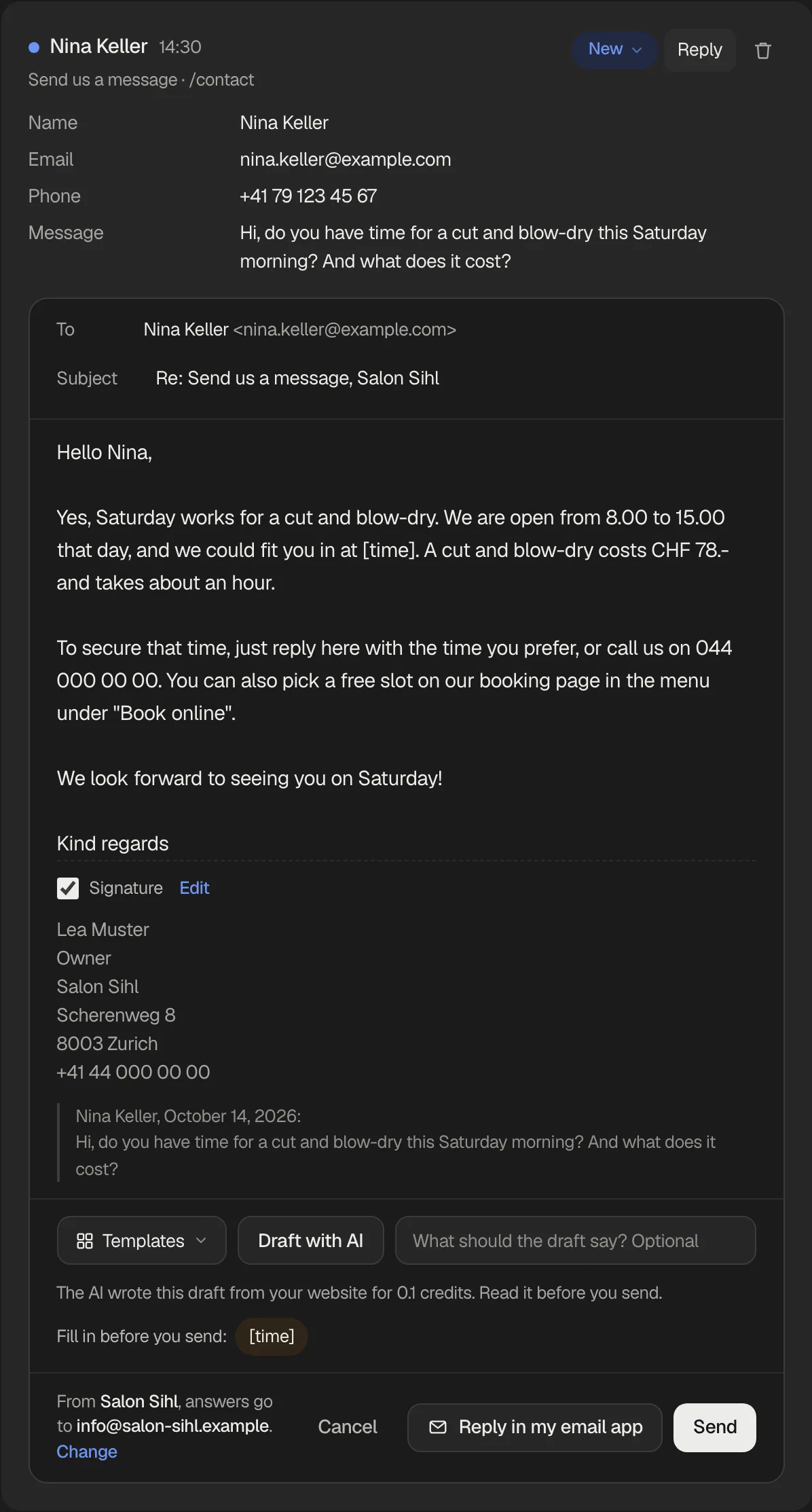
Click Reply under a message. The reply goes to the address the message came from, with a subject like “Re: Send us a message, Salon Sihl”, and your signature and a short quote of the message come below your text. Click Send: frascati sends it under your website's name, and when the person answers, the answer lands in your own inbox. The message is then Answered, and your reply shows under it.
- Templates puts a saved reply in.
{name}becomes the sender's name, and what changes each time stays in brackets, like[date]. Each website starts with four templates for its kind of business, in its language; Manage templates changes and deletes them and makes new ones. - Draft with AI writes a reply in the language of the message, from your website's pages, opening hours and prices, your Cloud tables and what you told the AI assistant. What it does not know, it leaves as a placeholder like
[time]instead of making it up. Type what the reply should say first if you like, such as “Yes, Saturday at 10 works”. A draft uses credits like every AI request, usually 0.1 to 0.5 credits, and the line under it says what it cost. Nothing goes out until you click Send. - Placeholders still in your reply show under it: click one to type over it. Send asks before a reply with a placeholder goes out.
- Signature: your name, your role, your business's address and phone, filled in at first from your website's details. Edit changes it for every reply of the website; untick it to leave it out of one reply.
- Answers go to the address that gets the email copies of new messages, or to your login address. Change chooses which.
- Reply in my email app opens the same reply in your own email program, on every plan. The message is then Answered too.
Sending from frascati comes with Starter, Pro and Business and with the free trial: up to 20 a day with Starter, 50 with Pro and 100 with Business, 10 a day during the trial. One address gets at most 5 replies from you in a day. A reply only goes to the address its message came from, and only when that address can receive email; a typo like a domain that does not exist is named before anything is sent. Templates, the signature and Reply in my email app work on every plan.
frascati adds no tracking to these emails: no invisible picture that reports an opening, and every link goes straight where it points.
Email copies
Messages also arrive by email, with the form and the page they came from, at your login address unless you choose another one:
In Messages, click Send to another address, type it, like info@your-business.com, and click Send confirmation.
Open the link in the email frascati sends there. Until then, copies keep going to your login address.
Use my login address switches back. Emails about bookings go to the same address.
How many messages
Form messages by email in 30 days, all your websites together: Starter 50, Pro 200, Business as many as you like. Past that, messages keep arriving under Messages, only without an email for each, and nothing is lost: visitors get the same thanks, and webhooks still send each one. You get one email that the limit is reached, at most once a month, and Messages shows which plan includes more. Emails start again as older messages pass 30 days. To keep robots from filling it, a website keeps at most 500 messages past your plan in 30 days, far more than a business gets; past that, messages are not kept, and Messages says how many. Messages within your plan are always kept.
A hidden field and a time check stop robots, and one visitor can send up to 10 messages a minute.
Visitor numbers
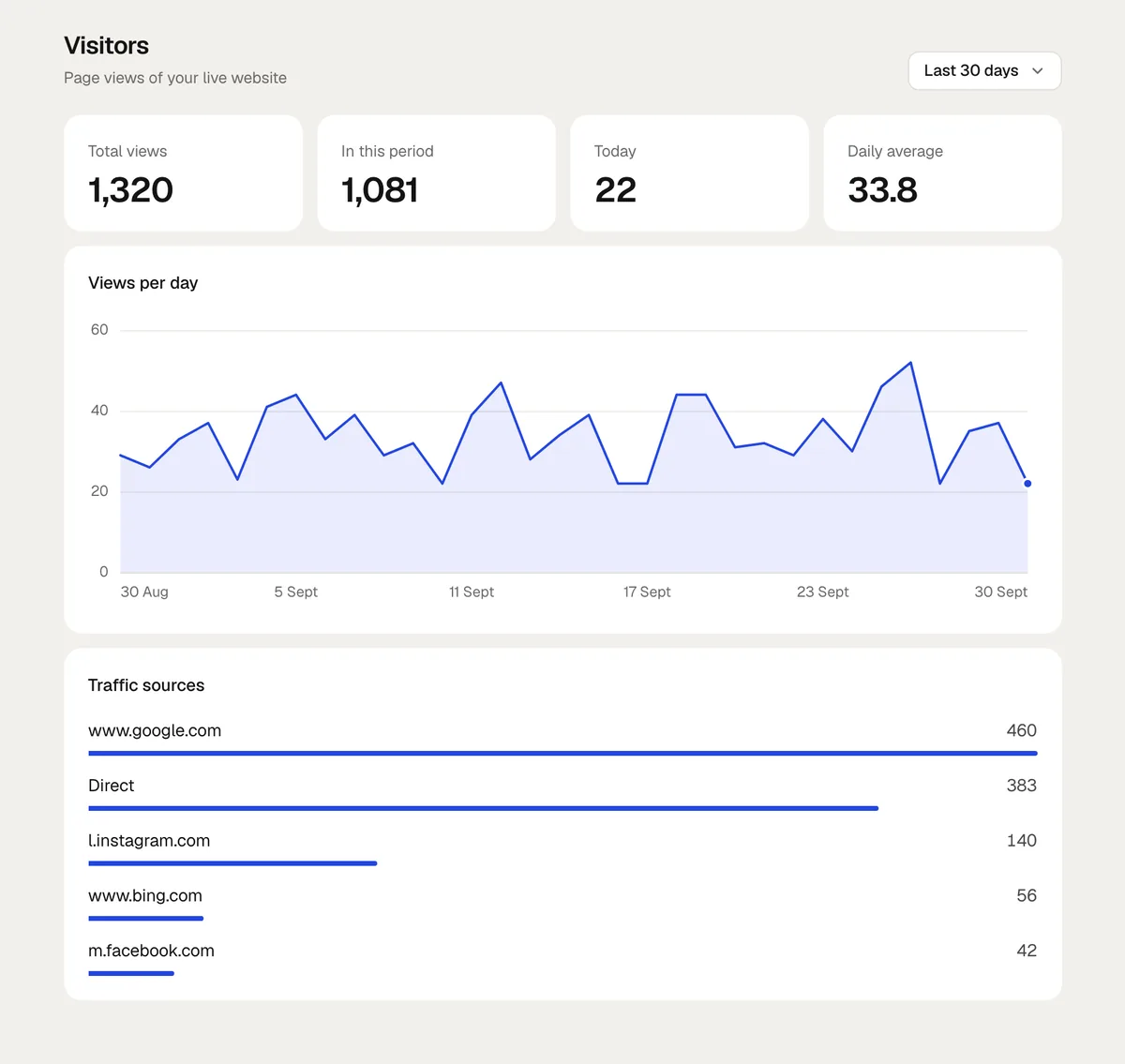
Open Visitors in the editor. frascati counts on its own servers each time a page of your published website is opened: there is no tracking code to add, and the counting stores nothing in your visitors' browsers.
- Total views
- Since the website was first published.
- In this period
- In the time range at the top right, from Today to Last 90 days.
- Today and Daily average
- Today so far, and the average day of the period.
- Views per day
- A chart of the period, with Pro and Business.
- Traffic sources
- The websites visitors came from, like google.com, with Pro and Business. Direct means they typed the address or came from an app or an email.
The numbers count opened pages, not people: a visitor who opens three pages counts three times. Search engine crawlers, test tools and pages a browser loads ahead do not count, at your frascati address and on your own domain.
Something missing or unclear? Write to us.