Payments with Stripe
Buy buttons and a small shop with a cart, paid through your own Stripe account. frascati takes no share of the money; only Stripe's fees apply. Included in every plan.
How it works
Say what you sell
Write it in the chat with the price, for example: “Sell a gift voucher for CHF 50 with a buy button.” frascati adds the button, or a small shop with a cart for several products. It never invents a price: without one, the page shows [price] until you give it.
Connect Stripe once
frascati asks for a key from your Stripe account in a secure window and creates your products there. See below.
Buyers pay on Stripe
A buy button opens Stripe's payment page, in the language of your website. After paying, the buyer sees a confirmation and gets an email in your website's name.
Orders land in the Cloud tab
Each paid order appears in the table Orders in the Cloud tab and in your inbox. That also works when the buyer closes the page before coming back: frascati checks Stripe every 15 minutes.
Connect your Stripe account
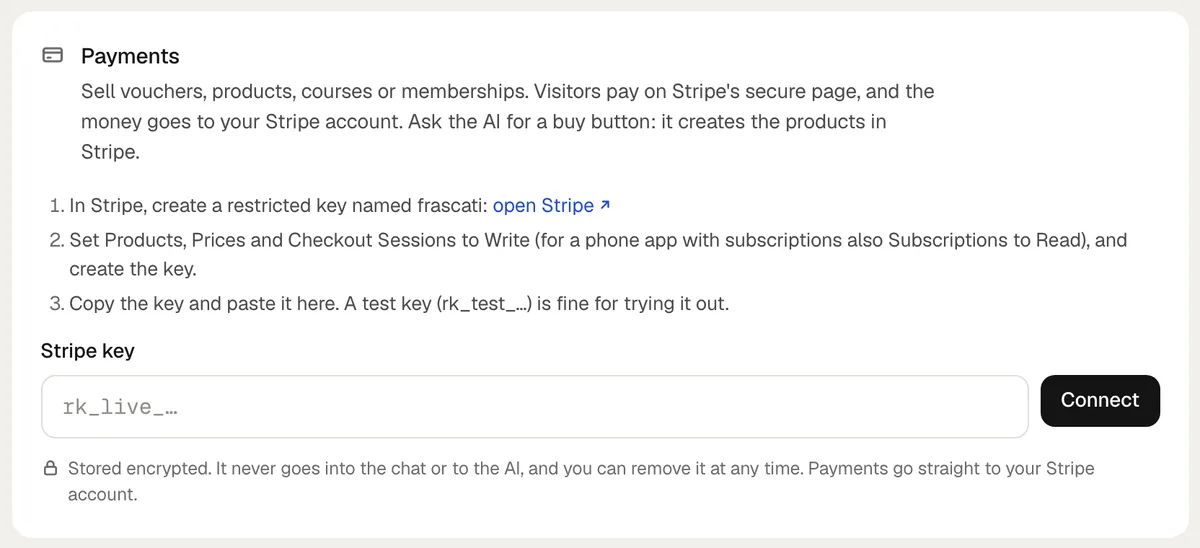
You need a Stripe account; opening one at stripe.com costs nothing. frascati connects with a restricted key, which allows only what the shop needs.
In Stripe, create a restricted key and name it frascati.
Set Products, Prices and Checkout Sessions to Write. For a phone app with subscriptions, also set Subscriptions to Read. Create the key.
Copy the key and paste it into the secure window. It opens in the chat when frascati needs it, and you find it in the Cloud tab under Payments. Never paste the key into the chat itself.
A test key (rk_test_…) is fine for trying it out: payments then run in Stripe's test mode, marked Test mode in the Cloud tab. Replace it with a live key (rk_live_…) under Replace key before real customers pay.
What you can sell
- Vouchers, products, tickets, courses and deposits as single payments, and memberships billed every month or every year.
- Up to 100 products per website, created in your Stripe account for you. Products you take off the website are archived in Stripe.
- A cart with up to 20 different items, 1 to 50 of each, in one currency. A membership is always paid on its own.
- Shipping: an address for the countries you ship to and one flat price per order. Vouchers and courses ask for no address.
- Discount codes you create in Stripe work on the payment page.
What stays with you and Stripe
- frascati does not hold or pay out money. Payouts, refunds and disputes run in your Stripe account.
- You deliver what you sell: you get the order and send the voucher, the goods or the access to the course yourself.
- There are no stock levels, so a product does not sell out by itself. Take it off the website in the chat.
- Shipping has one flat price per order, not prices by weight or zone.
- frascati calculates no VAT or sales tax and writes no invoices. Buyers pay the prices you set.
- On a website, a membership is a Stripe subscription, not a login. Phone apps have customer accounts.
Payments in phone apps
Phone apps use the same Stripe connection. Apple allows it for goods and services used outside the app, like a coffee, a class or a haircut. Digital things used inside the app, like premium screens, would have to go through Apple's in-app purchase, which frascati apps do not offer.
Something missing or unclear? Write to us.