Take bookings on your website
Guests pick a free time on your website and get a confirmation by email. You see every booking in the Cloud tab and get an email for each one. Included in every plan, and bookings use no credits.
Set it up
Ask for it in the chat and say what can be booked, when, and by how many at once:
“Add table reservations for up to 8 people, Tuesday to Saturday from 18 to 23.”
Or for appointments: “Let clients book a 60 minute session, Monday to Friday 9 to 17.”
frascati builds a booking page in the design of your website and sets up what can be booked, the opening hours and the places. Nobody can book without opening hours, so frascati asks for them when they are missing. Setting it up is a normal change and uses credits; the bookings themselves use none.
What you can set
You set and change all of this in the chat, like “Close at 22 on Sundays” or “Guests can book up to 30 days ahead”.
- What can be booked
- Up to 30 services, like a table, a haircut or a first consultation, each from 5 minutes to 12 hours long. A price can be shown next to a service, but guests pay nothing when they book.
- Places
- How many bookings can run at the same time. For tables, each guest takes a seat, and a group can be up to 100 people. A service can have places of its own, like a second room.
- Opening hours
- Per weekday, up to six time ranges a day, like 11:30 to 14:00 and 18:00 to 23:00. A booking always ends before closing time.
- Start times
- A new start time every 5 to 240 minutes, like every 30 minutes.
- How far ahead
- From 1 day to a year, like 60 days.
- Shortest notice
- How soon a booking may start, from right away to 14 days ahead, like two hours.
- Confirmation
- Automatic, or you confirm each request yourself, which frascati picks for practices and rentals.
- Phone number
- Optional, or required with every booking, which frascati picks for restaurants.
- Time zone
- The one of your business. All times are shown and counted in it.
How guests book
They choose what to book and, for a table, how many people come. Only days and times with a free place are shown.
They pick a day and a time and give their name and email address, and a phone number if you ask for one.
Right after, they get an email: a confirmation with a calendar file and a Google Calendar link, or, if you confirm yourself, a note that you will answer the request.
The day before, they get a reminder, if they booked at least a day ahead. The emails have a link to view the booking and cancel it until it starts.
The emails come in your website's name, and when guests reply, the reply goes to you. They are in the language of your website: English, German, French, Italian, Spanish, Portuguese and Dutch. For websites in other languages they are in English.
frascati locks the day while it saves a booking, so two guests never get the last place at the same time.
Manage bookings in the Cloud tab
Open Cloud in the editor and find Bookings. At the top you see whether you are Taking bookings, how many are coming up and how many requests wait for an answer. Below that, what can be booked and the opening hours, then every booking, grouped by day.
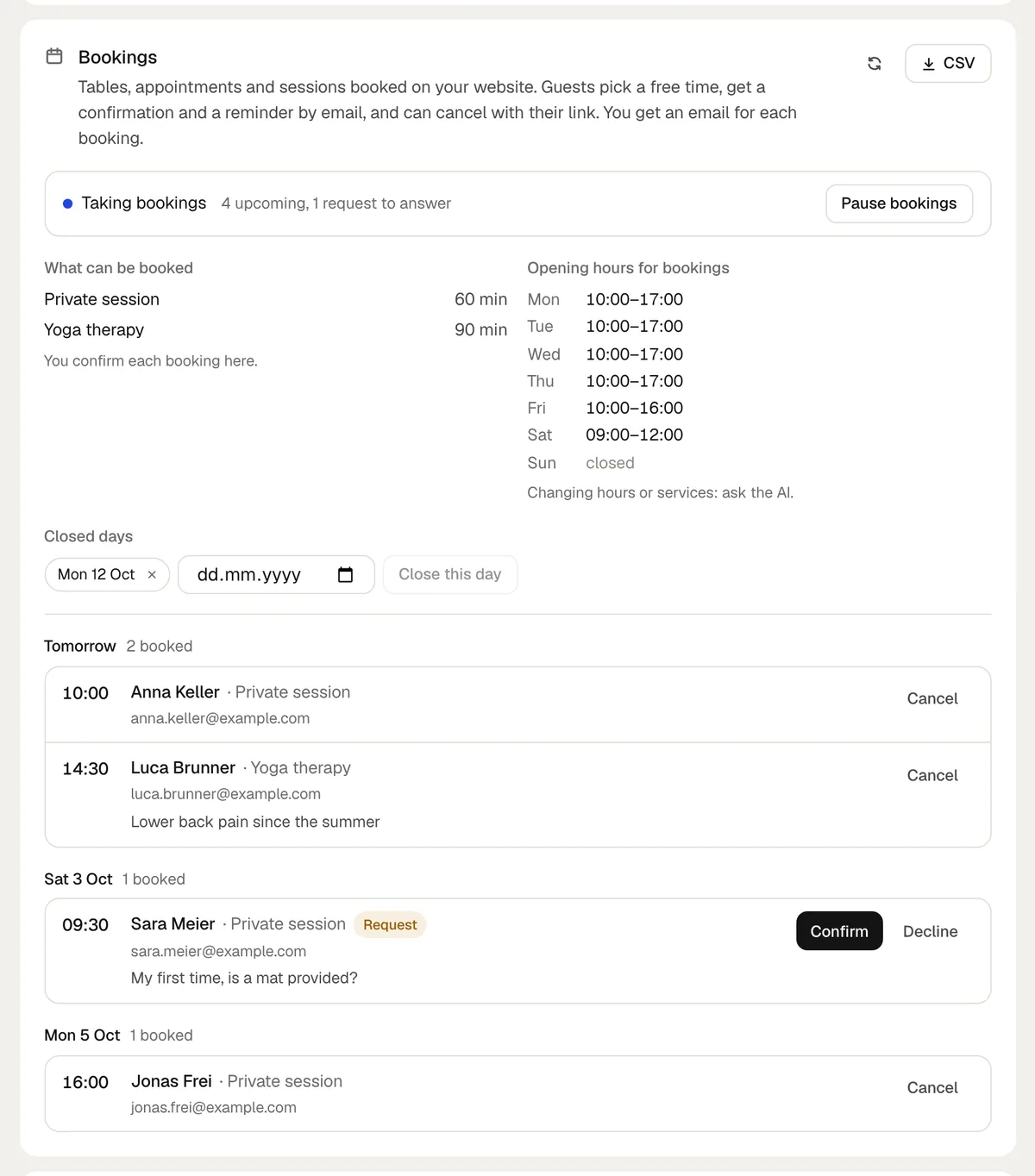
- Confirm or Decline
- Answers a request. The guest gets an email either way.
- Cancel
- Cancels a booking. frascati asks Cancel and email guest? first, and the guest gets an email.
- Close this day
- Pick a date, like a holiday, and nobody can book it. The × next to a closed day opens it again.
- Pause bookings
- Stops new bookings on the whole website until you click Take bookings again. Existing bookings stay.
- CSV
- Downloads all bookings as a file for Excel.
All of this uses no credits and takes effect right away. Opening hours and services you change in the chat.
Emails to you
You get an email for each new booking, each request and each booking a guest cancels. They go to the address set under Messages, which is your login address unless you chose another one. See Messages and visitor numbers.
Try it in the preview
You can book in the preview like a guest. These bookings are marked Test: they do not take a place, and you can delete them. The emails still go out, so use your own address.
Protection against spam
A hidden field and a time check stop robots. A visitor can book up to 6 times in 10 minutes, one email address up to 5 times a day, and a website takes up to 40 bookings an hour.
What online booking does not do
- Guests do not pay when they book. A price next to a service is only shown.
- There is no sync with Google Calendar, Outlook or other calendars. Bookings stay in the Cloud tab, reach you by email and can go on to Zapier, Make or n8n.
- Guests cannot pick a particular person, like their hairdresser. frascati counts free places, not the calendars of single staff members.
- Guests cannot move a booking. They cancel with their link and book again.
- Courses and events on fixed dates are not booked this way. They get a sign-up form that fills a Cloud table.
- Emails only, no text messages.
Already use Calendly, Cal.com, OpenTable, SimplyBook or Doctolib? Ask for a button that opens it. frascati does not embed other booking widgets, because they break inside the published website.
Something missing or unclear? Write to us.