Cloud tables
Tables for what changes often, like a menu, prices or events, and for what people send you, like sign-ups. You edit them in the Cloud tab, without credits and without publishing again.
Two kinds of tables
- Content on your website
- You fill it in, and the website shows it: a menu, events, opening hours, a timetable.
- Entries from visitors
- Visitors fill it in on the website, through a form, and only you see it: reservations, sign-ups, registrations.
Phone apps have the same two kinds: content in your app, and entries from the people who use it.
Create a table
The easiest way is to ask in the chat, for example: “Make the menu a table I can update myself.” frascati creates the table with the current entries and shows it on your website in its design. Asking for it is a normal change and uses credits.
Or click New table in the Cloud tab, give it a name, choose what it is for and add its fields. Then ask frascati in the chat to show it on your website.
Fields come in these kinds: text, long text, number, date, time, email, phone, link, image, yes or no, and choice. A table has up to 30 fields, and each one can be required.
Edit entries
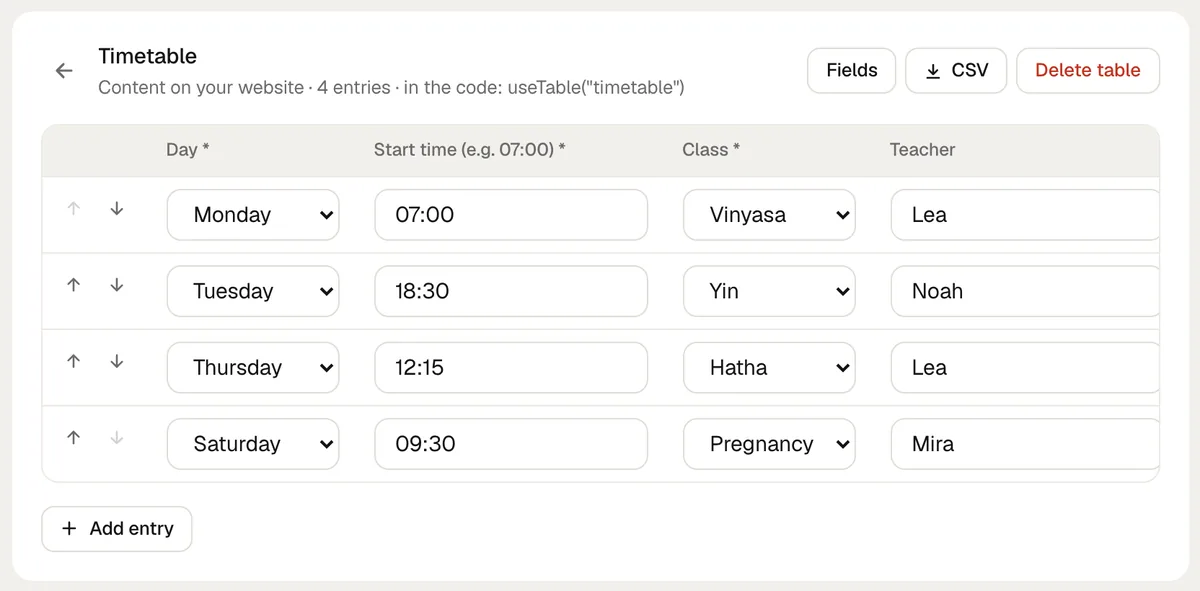
Open Cloud in the editor and click a table. Add entry, change, hide, reorder or delete entries and upload images. Your website shows the change right away, without publishing again, and editing uses no credits.
Entries from visitors
Entries are checked against the fields and protected against spam. You get an email for each one, and new entries are marked with a blue dot.
Only you see them, in the Cloud tab and in the emails. The website cannot read them, and the AI only learns how many there are.
Export and connections
CSV downloads any table as a file for Excel, with semicolons and in UTF-8. Under Connections in the Cloud tab, each new entry can go to Zapier, Make or n8n, and from there to Google Sheets or your CRM.
How many tables and entries
Starter
- Tables per website
- 3
- Entries per website
- 300
Pro
- Tables per website
- 20
- Entries per website
- 5,000
Business
- Tables per website
- 50
- Entries per website
- 50,000
| Plan | Tables per website | Entries per website |
|---|---|---|
| Starter | 3 | 300 |
| Pro | 20 | 5,000 |
| Business | 50 | 50,000 |
The entries of all tables of a website count together.
What tables do not do
- They are not a full database: no links between tables, no formulas, no queries of your own.
- Visitors cannot see or change what they sent, and websites have no member areas.
- Entries from visitors are never shown on the website, so a table cannot be a public guestbook.
- There is no import from a file. To fill a table with many entries at once, paste them into the chat, which is a normal change and uses credits.
Something missing or unclear? Write to us.